

Make.com Roundel Gmail CSV to Google Sheets: Append and Update Rows

I had a Make scenario that emailed itself a daily Roundel report as a zip of CSVs, cleared two Google Sheets, and reloaded every row from scratch. One run took 13 minutes, used 3,471 credits and moved 3.5 MB of data. Almost none of those rows had changed.
This post walks through how I rebuilt it so it only appends new rows and updates rows that changed, and the mistakes that cost me a few extra days along the way.
What the original scenario did
- Search Gmail for the latest report email with a zip attachment.
- Download the attachment and unpack the zip.
- Router: one route for
Table 1.csv, one forTable 3.csv. - Clear the target sheet (
A2:O25000). - Parse the CSV and run Add a row once per CSV row.
- Add a Gmail label to mark the email as imported, which also ran once per row.
Each CSV contains every day from a fixed start date, with a new day added daily. So every run rewrote around two thousand rows to add one.
Why it was so expensive
- One "Add a row" per CSV row. Every row is a separate operation, and every operation is a credit.
- The label module sat after "Add a row", so it ran once per row too. That doubled the cost.
- Both sheets were cleared and fully reloaded, even though most rows were identical to the day before.
- The clear step ran before the Gmail search. On a day with no new email, the sheets were wiped and nothing was added back.
The idea: a key and a signature
To decide whether a CSV row is new, changed or unchanged, I needed two things.
- A key: the fields that identify a row. For my first table that was
Account Name | Campaign Name | Event Date. For the second it wasAccount | Media Name | Item Name | TCIN | Campaign | Event Date. - A signature: every field of the row, joined into one string and stored in a helper column, which I put in column P.
A signature looks like this:
[Account|Campaign|2026-08-03|2574|18|$9.00|...]
The key is simply the start of the signature, up to and including the last key field and a |:
[Account|Campaign|2026-08-03|
That gives three cases, with no per-row lookup:
| Situation | Test against the stored signatures | Result |
|---|---|---|
| New row | The key is not found | Add a row |
| Changed row | The key is found, the full signature is not | Update a row |
| Unchanged row | The full signature is found | Nothing runs, nothing is charged |
I build the signature from the raw CSV text, not from the sheet's cells. Google Sheets reformats values such as $1,234.50, percentages and dates, so comparing against cell values would make every row look changed.
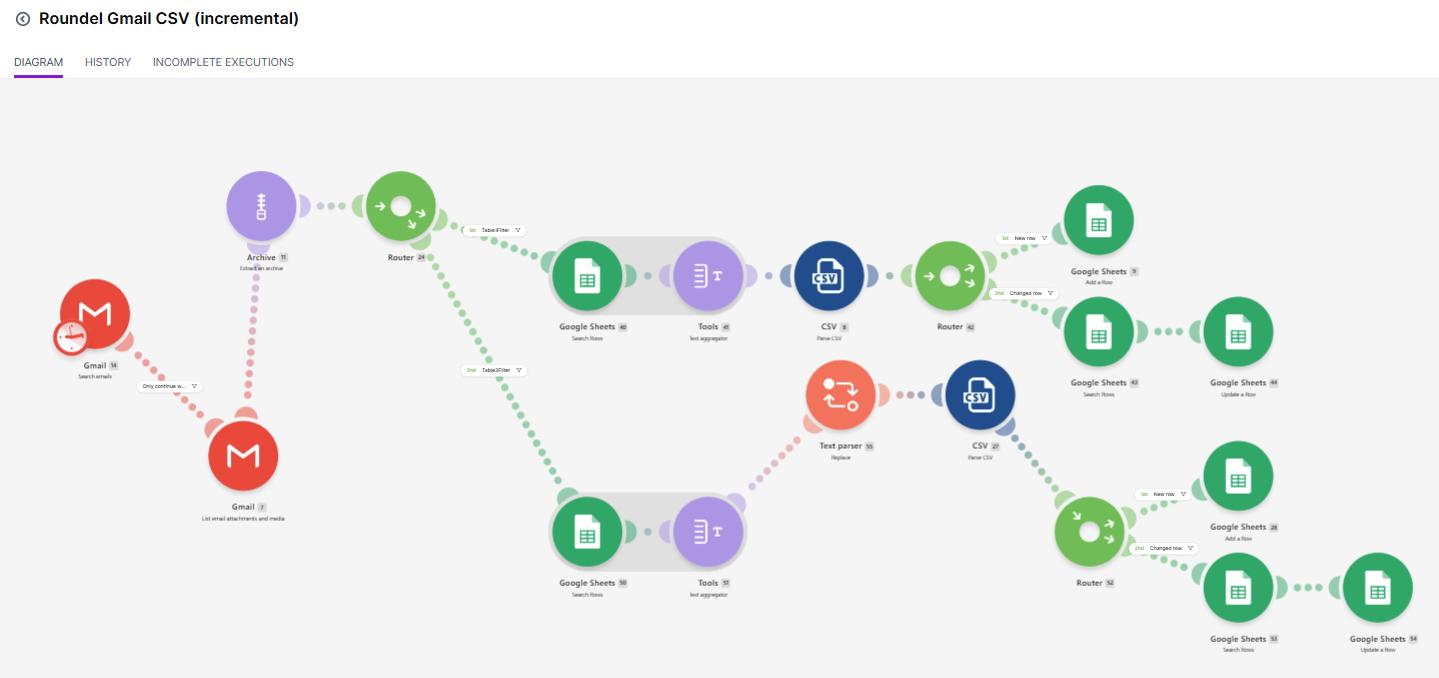
The flow
For each table's route:
Search Rows (all rows)  ->  Text aggregator  ->  Parse CSV  ->  Router
                                                                 |-- New row: Add a row
                                                                 |-- Changed row: Search Rows -> Update a row
- Search Rows reads the whole sheet once. No filter.
- Text aggregator joins column P of every row into one bundle, one signature per line. Aggregating means the Router sees a single block of text instead of thousands of bundles.
- Parse CSV turns the file into one bundle per CSV row.
- Router has two filtered routes.
The Router filters
All filters use the aggregated text from step 2.
New row route:
Aggregated text does not contain [{{8.col1}}|{{8.col2}}|{{8.col3}}|
Changed row route needs both conditions:
Aggregated text   contains           [{{8.col1}}|{{8.col2}}|{{8.col3}}|
Aggregated text   does not contain   [{{8.col1}}|...|{{8.col15}}]
The key starts with [ and ends with | on purpose. That way a key can only match at the start of a signature, and one date cannot match inside another value.
Writing the signature
In Add a row and Update a row, columns A to O map the CSV fields as usual. Column P gets the whole signature:
[{{8.col1}}|{{8.col2}}|{{8.col3}}| ... |{{8.col15}}]
Finding the row to update
The Changed row route first runs a second Search Rows with limit 1, filtered on column P containing the key. Update a row then uses that module's __ROW_NUMBER__. Only changed rows reach this step, so it costs credits only when the data actually moved.
Removing the label step
I originally kept the Gmail "Imported" label so that already-processed emails were skipped. The new design does not need it. The Gmail search is limited to one email, so it always returns the latest report. Reprocessing an email is harmless: every row already matches its signature, so no route fires.
I removed the label module and the -label:Imported line from the search query.
What went wrong along the way
1. Appending the whole file again. My first Table 3 test appended every row a second time. The key I had written skipped one of the columns, so the text it searched for was never a real piece of any signature, and every row looked new. The rule: the key must be a contiguous prefix of the signature, in the same field order.
2. "Unable to parse range: undefined". The second Search Rows module failed the first time a row actually changed. I had never selected the filter column in the module's settings, so Make could not build the range. Pick column P explicitly.
3. A footer in the CSV. One day both tables failed at the Parse CSV step with "Number of columns on line … does not match header". The export had started adding a footer after the data:
Filters:
Event Date BETWEEN 2026-08-07,2026-11-04
Those lines have the wrong column count, so the parser stopped. The fix is to strip everything from Filters: onward before parsing, with a Text parser → Replace module using the pattern [\s,]*Filters:[\s\S]*$ and an empty replacement. The footer also showed the report window is a rolling 90 days, not "everything since the start". That is another reason to append instead of reload: old days drop out of the CSV but stay in the sheet.
4. Dates swapped in the sheet. With USER_ENTERED, Sheets parsed some dates with day and month reversed because of the spreadsheet's locale. The signature is built from the raw CSV text, so the key logic was unaffected, but any reporting that reads the date column has to account for it. Check your locale, or write dates as ISO text.
Before the first run
- Put a header such as
Signaturein column P of each target sheet. - Clear the old data rows once,
A2:P. Rows without a signature would all look new and be duplicated. - Run once as a full load, then run again. The second run should add and update nothing.
What to expect
The first run costs about what the old scenario did, because it loads everything. After that, a daily run is a handful of fixed operations (Gmail search, attachment download, unpack, the two sheet reads, the CSV parses) plus one credit per new row and two per changed row. Check your own History tab after a few days rather than trusting my estimate. Data transfer stays similar, because the zip is still downloaded each time.
When to use something simpler
If you do not need to track changes and the files never overlap, Parse CSV followed by an Array aggregator and Add multiple rows writes every row in a single operation. It is the cheapest option, but it will duplicate any rows that appear in two consecutive reports.
The signature approach is for the case where each file repeats earlier data and you want the sheet to hold one clean, current copy of each row.
About the author
- A Freelance Dashboard Developer
Comments
Join the discussionNo comments yet. Be the first to comment.